Navigation Regions
Navigation is the logic that determines how an agent move from Point A to Point B. Whether you are working in 2D or 3D, the core "brain" is the NavigationServer.
1. 2D Navigation (Top-Down / Side-Scroller)
In 2D, the logic follows the same "Server > Region > Agent" stack, but uses pixel coordinates rather than world units.
The 2D Hierarchy
- NavigationRegion2D: The parent node that contains your walkable area.
- NavigationPolygon: Unlike 3D which uses a mesh, 2D uses a polygon to define the floor.
- NavigationAgent2D: The traveler node attached to your 2D character.
The 2D Workflow
- Define the Area: Draw a
NavigationPolygoninside yourNavigationRegion2Dto mark the walkable floor. - Child Nodes: Just like in 3D, any static obstacles (like walls or pits) should be children of the Region so the baker can "carve" them out of the polygon.
- Pathfinding: Use the
NavigationAgent2Dto get the next position in the 2D plane.
2. 3D Navigation (FPS / Top-Down 3D)
In 3D, we deal with height, ramps, and complex geometry.
The 3D Hierarchy
- NavigationRegion3D: The parent node added to your level tree.
- NavigationMesh: The geometry data (baked from your environmental children) that defines the floor.
- NavigationAgent3D: The traveler node for your 3D NPC.
The 3D Tree Setup
As seen in your level tree, everything you want the AI to "see" must be a child of the NavigationRegion3D:
- NavigationRegion3D
- LevelObjects (Node3D)
- Platforms, Bridges, Buildings, Ramps
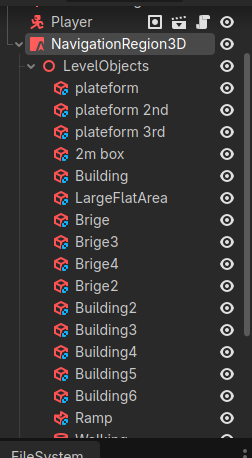
- Platforms, Bridges, Buildings, Ramps
- LevelObjects (Node3D)
Comparison Summary
| Feature | 2D Navigation | 3D Navigation |
|---|---|---|
| Server | NavigationServer2D |
NavigationServer3D |
| Mapping Tool | NavigationPolygon |
NavigationMesh |
| Logic | Pixels / Vector2 | World Units / Vector3 |
| Obstacles | Static Polygons | 3D Meshes / Baked Geometry |