Reverb
Reverb
I’m going to help you understand what reverb actually is and how to hear what it’s doing to your sound. Most guides treat this like a math equation, but it’s really about texture and space.
To keep things simple, I’ll use Fruity Reeverb 2 (from FL Studio) as the example. It looks simple, but the way it works applies to almost every pro plugin out there.
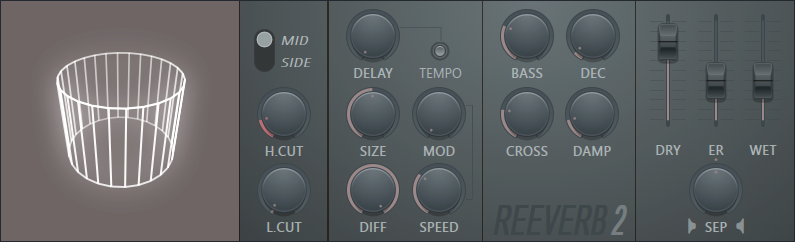
What is Reverb?
It’s hard to describe in text, but easier to hear. Check out this video of a saxophone in a parking lot.
Notice how the sound doesn't just stop? I like to describe reverb as a "double release with a stay." 1. The First Release: The instrument stops playing. 2. The Second Release: The "ghost" of the sound stays in the air, vibrating against the environment.
The Three Layers (DRY, ER, WET)
On the right side of the plugin, you’ll see three sliders. These are the "ingredients" of your space. Most people get these confused, but here is the gap they don't tell you:
-
DRY (The Source): This is the "pure" sound. It’s the person standing right in front of you. If you turn this down, the sound feels far away or underwater.
-
ER (Early Reflections): These are the very first bounces off the closest walls. This gives the sound its texture. If you want a sound to feel "real" but not "echoey," you want more ER.
-
WET (The Stay): This is the "tail" of the reverb. It’s the long, shimmering part that lingers. This is what makes a sound feel "epic" or "huge."
Size and Diff (The Shape of the Space)
Now that you have your "double release" and "stay" levels set, you need to tell the computer how big the room is and what the walls are made of.
🏠 Size
This is exactly what it sounds like. It changes the "timing" of the echoes.
- Small Size: The bounces happen so fast they blend together instantly. It feels like a closet or a car interior.
- Large Size: The bounces take longer to travel. This creates that "grand" feeling of a stadium or a cathedral.
- The Gap: Beginners often turn the "WET" up to get a big sound, but they leave the "Size" small. This just sounds like a loud, metallic closet. If you want "Big," you must increase the Size.
🌪 Diff (Diffusion)
This is a fancy word for "How smooth are the walls?"
- Low Diffusion: The walls are flat (like glass or concrete). The echoes stay sharp and clear. You might even hear a little "flutter" or "chatter."
- High Diffusion: The walls are bumpy or filled with stuff (like a library with books or a room with curtains). The echoes get blurred together into a smooth, thick "cloud" of sound.
- The Gap: Use Low Diffusion for "cold" or "digital" sounds (like a Sci-Fi lazer). Use High Diffusion for "warm" sounds (like a soulful vocal).
Why this matters:
-
For Music: If your "Stay" (WET) is too loud, your notes will bleed into each other and create a "muddy" mess.
-
For Game Dev: If you want a sound to feel like it's in a small wooden house, you use high ER but very low WET.
-
For Video Editing: Reverb helps "glue" a voiceover to a scene so it doesn't sound like it was recorded in a plastic booth.
The "Visual" Check
Think of it like a flashlight in a dark room:
-
DRY is the bulb itself.
-
ER is the light hitting the floor at your feet.
-
WET is the light reaching the back corners of the room.
Each genre has it's own way of adding reverb
Reverb isn't "one size fits all." Different styles of music use that "stay" and "double release" to create different moods.
🎸 Blues & Rock (The "Room" Feel)
- The Goal: To sound like a band playing in a real smoky club.
- The Setup: High ER (Early Reflections) and a medium WET.
- The Secret: You want the listener to feel the "walls." If the reverb is too clean or long, it feels like a fake movie. You want a short, "wooden" sounding stay.
🎤 Hip-Hop (The "In Your Face" Feel)
- The Goal: To keep the lyrics hitting hard and clear.
- The Setup: Very high DRY, almost zero WET on the main vocal.
- The Secret: Most Hip-Hop uses very little reverb because they want the rapper to sound like they are standing an inch from your ear. They only use a long "stay" on specific background words (ad-libs) to give the track depth.
🎹 EDM & Pop (The "Dreamy" Feel)
- The Goal: To create a massive, otherworldly atmosphere.
- The Setup: Low ER, very high WET, and a long Decay.
- The Secret: In EDM, the reverb is its own instrument. Use a long "stay" to fill up all the empty space, making the track feel "wall-to-wall" huge.
👾 Game SFX (The "World-Building" Feel)
This is where it gets fun for developers. Reverb tells the player where they are.
- The Lazer Sound: * The Trick: If you add a "Spring Reverb" to a lazer, it creates a "twangy" metallic stay.
- Why it works: Think of the Star Wars blasters. That "pew!" has a metallic "stay" that makes it feel high-tech and dangerous rather than just a digital beep.
- Footsteps:
- Small Room: High ER, Tiny Wet. (Feels like a house).
- Cave/Canyon: Low ER, Huge Wet. (The sound takes a long time to bounce back).
Pro-Tip: The "Tail" Test
A good way to tell if you have the right reverb for your genre is to stop the music suddenly.
- In Blues, the "stay" should vanish quickly like a real room.
- In EDM, the "stay" might ring out for 5 or 10 seconds like a giant cathedral.
EQ tips:
The "Muddy Mix" (When the Stay is Too Long)
The biggest mistake people make is letting the "stay" of the reverb get in the way of the next note. This is called a Muddy Mix. It sounds like a wash of brown noise where you can't hear the melody anymore.
How to fix the Mud:
- The High-Pass Filter (Low Cut): Reverb on bass notes (like a kick drum or a bass guitar) is very dangerous. It creates a "rumble" that eats up all the energy. Use the LO CUT knob in Reeverb 2 to cut out the deep, rumbling bass from the reverb.
- The "Decay" Check: If your song is fast, your "stay" needs to be short. If the reverb from the first note is still loud when the second note hits, they will "fight."
- Rule of thumb: The reverb should mostly fade out before the next major beat hits.
- Damping: Use the DAMP knob to make the reverb fade out "darker." This mimics a room with carpets. It keeps the "shimmer" from being too piercing and annoying to the ears.