Compression
I’m going to help you understand what compression actually is and why it’s on almost every sound you hear in a modern game or song. Most people think it just makes things "louder," but it’s actually about control and impact.
To keep things simple, I’ll use Fruity Limiter (in Comp mode) as the example. It has a visualizer that shows you exactly how the "logic" is affecting your wave.
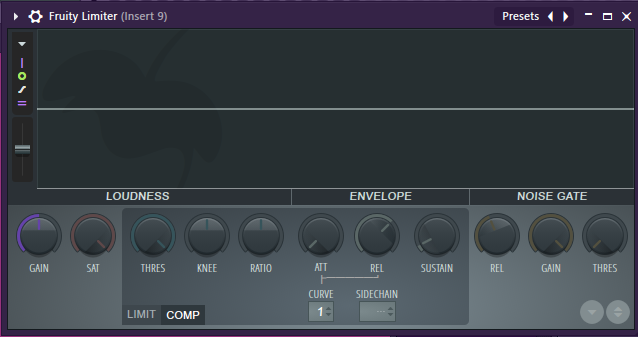
What is Compression?
Think of a compressor as an automatic volume knob.
Imagine a voice actor who whispers one second and screams the next. If you turn the volume up to hear the whisper, the scream will blow out the player's speakers. If you turn it down for the scream, you can't hear the whisper. A compressor automatically "squashes" the loud parts so you can turn the whole thing up without clipping.
I describe compression as "The Anchor." It keeps the sound from floating away or jumping out too far; it keeps it locked in place.
The Four Ingredients (The "Logic" of the Squash)
On most compressors, you’ll see these four main knobs. If you think like a programmer, these are just a conditional statement:
- THRESHOLD (The "If" Statement): This sets the level where the compressor starts working.
- Logic:
if (Volume > Threshold) { StartSquashing(); }
- Logic:
- RATIO (The "How Much"): This decides how hard the sound is squashed once it passes the threshold.
- A 2:1 ratio is a gentle hug. A 10:1 ratio is a heavy stomp.
- ATTACK (The "Reaction Time"): How fast the compressor grabs the sound.
- Fast Attack: Kills the "crack" or "hit" at the start. Good for smoothing out a vocal.
- Slow Attack: Lets the "crack" through before squashing the rest. This is how you make drums or gunshots sound "punchy."
- RELEASE (The "Letting Go"): How fast the volume returns to normal after the sound drops back down. If this is too fast, the sound "pumps" or "breathes" in a weird way.
Why we add it to almost every sound
If you don't compress your audio, your mix will feel "thin" or "stabby." We use it for three main reasons:
- The "P" and "S" Problem (Transients): It tames the harsh "hits" in the air—like the "P" in a voiceover or the initial slam of a car door.
- Consistency: It ensures that every gunshot or footstep feels like it has the same "weight," even if the original recordings vary.
- Headroom: By flattening the "peaks" (the spikes), you create more room to turn the overall game volume up without hitting 0dB (Clipping).
Compression vs. Limiting (The Brick Wall)
People get these confused, but here is the gap:
- A Compressor is a "Soft" effect. It squashes the sound proportionally. It’s like a spring.
- A Limiter is a "Hard" effect. It is a brick wall. Anything that hits the ceiling is stopped instantly.
- The Visual: A compressor is a ceiling made of foam. A limiter is a ceiling made of concrete.
Engine-Specific Tips (Game Dev)
👾 Unreal Engine (Submixes)
In Unreal, don't put a compressor on every single SoundWave—that’s an overhead nightmare for the CPU.
- The Move: Send all your "SFX_Explosions" to one Sound Submix. Put one Compressor on that Submix.
- Sidechaining (The Pro Trick): You can tell the Music Submix to compress itself whenever the Dialogue Submix is playing. This is called "Ducking." It automatically lowers the music so the player can hear the story.
- Ref: UE Compressor Submix Docs
🎮 Unity (Audio Mixer)
Unity handles this through the Audio Mixer window.
- The Move: Add the "Standard Compressor" effect to a Group (like your Master or SFX group).
- The Gap: Unity’s built-in compressor is basic. If you want that "C-Style" control, most pro devs use the Native Audio SDK to write their own DSP effects in C++.
- Ref: Unity Audio Mixer Docs
The "Visual" Check
Think of your sound wave like a piece of paper:
- No Compression is a crumpled-up ball. It’s messy, has sharp edges, and takes up weird space.
- Compression is ironing that paper flat. It’s the same piece of paper, but now it’s smooth, consistent, and easy to stack with other sounds.
Pro-Tip: The "Over-Compressed" Trap If you compress a sound too much (High Ratio, Low Threshold), you lose all the "life." It sounds "squashed," "dead," or "dull." If your sound feels like it lost its "hit," increase your Attack time to let the initial "crack" through!
Summary Table: Compression Settings
| Sound Type | Attack | Ratio | Why? |
|---|---|---|---|
| Vocals | Fast | 2:1 - 4:1 | Keeps the voice steady and clear. |
| Drums/Guns | Slow | 4:1 - 8:1 | Lets the "crack" through but keeps the "slam" heavy. |
| Master Mix | Very Slow | 1.5:1 - 2:1 | Just "glues" everything together without changing the sound. |