Input Mappings & Action Maps
I’m going to explain this as clearly and "on the job" as I can. In the modern Unreal workflow (Enhanced Input), your controls are broken down into a hierarchy.
The Hierarchy
- Input Actions (IA): These are the individual "verbs" (e.g., Move, Jump, Shoot).
- Input Mapping Context (IMC): This is the collection of those verbs. You can have as many Input Actions as you need in your Mapping Context.
While you can technically have multiple Mapping Contexts active at once (like one for "Walking" and one for "Driving"), you generally apply one primary context to your Player Controller or Character BP to initialize your controls.
Practical Example: Top-Down Movement
I like to break my inputs into movement directions or logic groups. Since I’m working on a top-down game, we only have 2D movement (Up/Down and Left/Right).
I created individual Input Actions for these, and then a single Input Mapping Context to join them together. This is what actually gets added to the player.
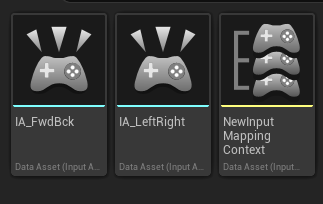
In the image above:
- IA_: These are the specific Input Action assets for Left/Right and Up/Down.
- IMC_: This is the Mapping Context asset. This is where you tell Unreal: "When I press 'W', trigger the 'Up' Input Action."(I didn't do this but mine would be IMC_Player)